Gacha Life
Gacha Life is an Android game for creative play. Build anime-style characters, mix outfits and hairstyles, then stage scenes in Studio or try mini-games to earn gems and pull gacha rewards.
Screenshot




Information from gacha-life

Overview of the Gacha Life APK
Gacha Life APK is the Android installation file for players looking for a secure and working version of the game. By downloading the APK, you can access the full experience without relying on app stores. In this guide, we’ll break down the core features, game modes, practical tips, safety notes, and performance advice, so you know exactly what to expect before installing. The goal here is clarity and real value—not keyword stuffing.
Developed by Lunime, is a casual game centered on anime-style creativity. Players can design unique characters, create stories in Studio Mode, chat with NPCs in Life Mode, and play mini-games to earn gems for gacha rewards. It’s light, playful, and perfect for both short creative breaks and longer storytelling projects.
Who Should Try Gacha Life?
This game shines for anyone who:
- Loves making skits or short animations for TikTok and YouTube.
- Wants easy-to-use anime-style characters for VTubing or creative projects.
- Enjoys designing original characters and casual roleplay.
- Prefers quick, creative sessions instead of competitive battles.
There’s no PvP or heavy RPG grind here—it’s more of a sandbox for creativity with small mini-game breaks. Gacha Life also works offline, which makes it great for bus rides, between classes, or when Wi-Fi isn’t available. Younger players can have fun too, though parents should guide online interactions to keep things safe.
Game Modes Explained, Simple Breakdown
Studio Mode
This mode is where most of the magic happens. You can set up characters in different poses, add text bubbles, and drop in backgrounds to build skits. Many creators use it for quick storyboards or short-form content. A smart workflow: plan your scenes first, then reuse saved characters to speed things up.
Life Mode
In Life Mode, your characters move through different locations like towns or schools, chatting with NPCs. These short conversations can actually inspire new skit ideas. Think of it as a creativity spark—NPC dialogue can be turned into jokes, plot twists, or even full scripts.
Mini-Games & Gacha
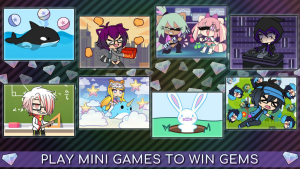
There are eight mini-games ranging from rhythm challenges to dodge-and-collect mechanics, plus even a math game. Each one gives gems, which are then used in the gacha system to pull items like props or costumes. It’s all optional but adds variety to your sessions without requiring payment.
Character Creation Tools That Pop in Gacha Life
Visual Customization
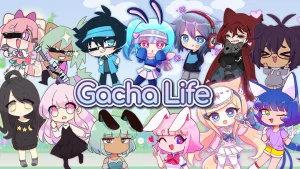
With 20 character slots, you can build a full cast for your stories. Customization covers hair, eyes, mouth, skin tone, and more, with color options and layering for unique looks. A handy trick is to save presets for different settings like “school,” “battle,” or “party,” so you can switch styles quickly while filming.
Wardrobe, Poses, Backgrounds
The wardrobe system lets you combine shirts, sleeves, pants, belts, shoes, hats, and accessories. Add hundreds of color variations, and your characters will always feel fresh. Combined with preset poses and diverse backgrounds, you can show emotion visually instead of relying on long text bubbles. This keeps your skits cleaner and easier to follow.
Smarter Progress and Gacha Tips
Managing gems is key if you want steady progress:
- Play mini-games in short daily sessions to stock up on gems.
- Resist impulse pulls—save gems for sets that actually fit your story ideas.
- Focus on props and backgrounds that expand your storytelling options instead of cosmetic-only items.
- Capture multiple emotions and angles in a single recording session to save time later.
And importantly, remember: spending money isn’t required. Everything can be earned for free, though optional purchases are available. That flexibility is why many fans stick with the game long-term.
Community Sharing and Player Safety
A big part of Gacha Life’s popularity is the creative community. Thousands of players post skits on platforms like YouTube and TikTok. To make your content stand out:
- Export with consistent aspect ratios to avoid cropping.
- Add captions so viewers can follow along easily.
- Credit music and assets when needed to stay fair and avoid copyright issues.
For younger players, safety should come first. Avoid sharing personal details, use family guidance for uploads, and stick to community-friendly spaces. For updates, new events, or bug fixes, the safest route is Lunime’s official pages and in-app announcements.
Pros and Cons, Real Talk of Gacha Life
Pros
- Deep customization that lets you create a huge variety of characters.
- Studio Mode makes skit-making quick and fun.
- Works offline with no constant internet needed.
- Mini-games are simple yet rewarding.
- Free-to-play friendly with a fair gem system.
Cons
- No advanced storylines or competitive systems for hardcore gamers.
- Can lag on older devices or high-resolution screens.
- Gacha randomness may delay getting specific items.
- Skits with too much text may look cluttered on small screens.
Final Thoughts and Safe Download
Gacha Life is best seen as a creative sandbox—a place where you can design characters, stage stories, and play a few light mini-games along the way. It’s ideal for Gen Z players who love making content or anyone who just wants a fun, low-pressure game.
If this sounds like your style, make sure to download safely. Want to give it a go? Get the official, secure Gacha Life APK from APKJaka and start building your stories today.
Download APKFAQs
What is Gacha Life?
Gacha Life is a casual Android game by Lunime where you design anime-style characters, dress them up, and create skits or stories using Studio Mode.Is Gacha Life APK free?
Yes, the APK is free to install and play. You can earn gems by playing mini-games, and in-app purchases are optional, not required.Can I play Gacha Life offline?
Yes, you can play offline. Studio Mode, Life Mode, and mini-games all work without internet once the APK is installed.How many characters can I create?
You get up to 20 character slots in Gacha Life, each fully customizable with hairstyles, clothes, poses, and colors.Is Gacha Life safe for kids?
The game is designed for a younger audience, but parents should guide kids when sharing content online to keep their experience safe.