
ScreenCast
Screenshot
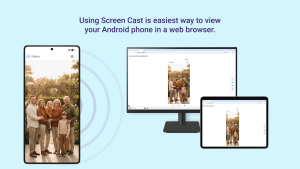
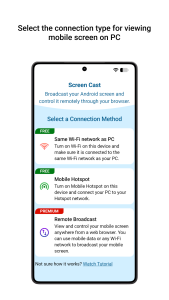
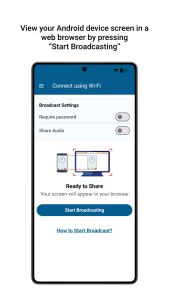
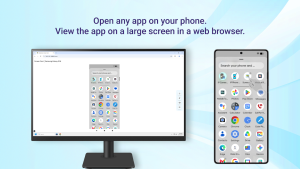
Information from screencast

Video
Introduction ScreenCast APK
ScreenCast APK is the installation file for Android users who want quick access to a tool that mirrors their mobile screen onto other devices. Whether you’re trying to connect with a PC, Mac, Smart TV, or tablet, this app gives you the flexibility to share what’s on your phone without cables or complicated setups. In this article, we’ll break down what the app does, why it matters, and how it can actually solve real-life problems.
The app itself is a utility app that allows Android devices to project their screens onto multiple platforms through browsers like Chrome, Firefox, or Safari. It’s made for those who need smooth visual sharing for presentations, online lessons, video playback, or even casual streaming with friends. The app is lightweight, browser-friendly, and secure, making it a go-to solution for users who value both convenience and control.
Key Features of ScreenCast
Screen Sharing Options
- Stream your phone’s screen to multiple devices at once—PCs, tablets, or even smart TVs.
- Works seamlessly with mainstream browsers, so no extra installation is needed.
Security and Accessibility
- Add a password to stop strangers from hopping onto your broadcast.
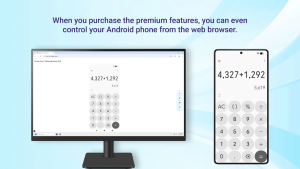
- Remote control access requires special permissions, keeping your data safe while giving you flexibility when you approve it.
Customization Tools
- Keep your screen awake during a broadcast to avoid interruptions.
- Switch between supported languages like German, French, Spanish, Portuguese, and Italian, making it accessible worldwide.
How ScreenCast Saves Time
ScreenCast cuts down the hassle of carrying HDMI cables or downloading heavy software on every device. Instead, it allows instant wireless connections through Wi-Fi or even mobile data. Imagine walking into a meeting room and casting your slides directly to a big screen in seconds. That’s time saved and stress avoided.
For teachers or online trainers, it simplifies lessons by showing mobile apps or tutorials live without needing additional setups. On the personal side, sharing a funny clip or vacation video becomes as easy as opening a browser and tapping share. No waiting, no fiddling—just instant visibility.
Real-World Uses of ScreenCast
The app isn’t just about convenience; it actually adapts to different lifestyles and scenarios.
- Classrooms: A teacher can display a science diagram from their phone onto a projector, making lessons more interactive and visual.
- Business meetings: Professionals can skip USB drives and just cast reports or charts in real time.
- Home use: Families can stream vacation photos or binge videos together on a TV without needing extra devices.
And for Gen Z users? It’s perfect for pulling up TikTok edits, memes, or YouTube playlists on a larger screen when hanging out with friends. The app makes sharing content more social and way less complicated.
Tips and Tricks for Better Performance
Connection Methods
The app supports Wi-Fi, mobile hotspot, or data connections. Wi-Fi is usually the most stable, but hotspot is a solid backup when you’re on the go.
Avoiding Common Issues
Lag often comes from poor internet, so a strong connection is key. Also, tweak your settings so your phone doesn’t go into sleep mode mid-stream.
Recording Options
If you want to keep a copy of what’s happening, you can use add-on tools like My Screen Recorder. This is especially handy for online classes or work demos you may need to review later.
Pros and Cons of ScreenCast
Strengths
- No cables, no stress—just wireless sharing.
- Works with multiple browsers and platforms, so compatibility isn’t an issue.
- Allows multiple devices to view the same broadcast at once.
Limitations
- The app doesn’t transmit audio, so you’ll need other tools for full media streaming.
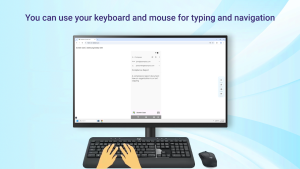
- Remote control requires accessibility permissions, which may be a learning curve for less tech-savvy users.
This balance shows the tool is transparent about what it can and cannot do, which helps users set realistic expectations.
Why ScreenCast Stands Out in 2025
In a market crowded with screen-mirroring apps, ScreenCast stays relevant because it doesn’t overcomplicate things. Other apps might require both devices to download matching software, but here you just need a browser. That keeps it light and accessible for almost anyone.
Its ability to connect multiple devices at once makes it a reliable choice for group settings—whether in a classroom, a business environment, or at home. And because it works directly with browsers, it stays updated with new tech standards, keeping pace with how people actually use devices in 2025.
What makes app appealing is its blend of simplicity and flexibility: beginner-friendly for first-time users but still offering advanced touches like password security and multi-language support.
Conclusion
The app provides Android users with a simple yet powerful way to mirror their screens wirelessly. It’s secure, convenient, and designed to adapt to work, school, or personal needs. Whether you’re presenting, teaching, or just streaming content for fun, app makes it quick and easy to share your screen with others.
If you’re looking for a safe and reliable download, grab the official ScreenCast APK today from APKJaka and make your screen-sharing smoother than ever.
Download APKFAQs
What is ScreenCast APK?
ScreenCast APK is the Android installation file for the ScreenCast app, which lets you share your phone screen wirelessly to devices with a browser.How does ScreenCast work?
It connects your phone to other devices through Wi-Fi, mobile hotspot, or data. Just open the link in a browser, and your screen appears instantly.Can I connect multiple devices at once?
Yes, ScreenCast allows multiple viewers to connect at the same time, making it great for group settings like classes or meetings.Does ScreenCast share audio too?
No, ScreenCast mirrors only the screen. You’ll need separate options if you want to stream sound.Is ScreenCast safe to use?
Yes, it’s safe. You can set a password for your session so only the people you allow can view your screen.