
LMC 8.4
LMC 8.4 is a camera app for Android that gives users pro-level controls like HDR+, night shots, and RAW capture, solving the limits of stock cameras with sharper, cleaner photos.
Screenshot
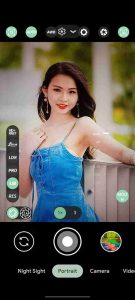
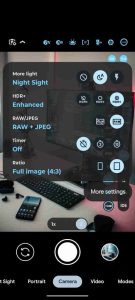
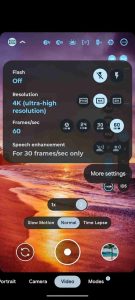
Information from LMC 8.4

Introduction to LMC 8.4 APK
LMC 8.4 APK is an installation file for an Android photography mobile app that equips users with advanced tools for better photography. LMC8.4 is a custom-built camera app designed to deliver sharper details, richer colors, and superior low-light results compared to standard camera software. It has gained attention among Android users because it pushes mid-range devices closer to flagship-level imaging without requiring new hardware.
The app addresses several issues often found in stock camera apps: blurry night shots, lack of manual control, and restrictions on secondary lenses like ultrawide or telephoto. Developed by independent creators and supported by a strong online community, it provides an accessible solution for anyone frustrated by limited native options. In the following sections, we’ll look deeper into its features, compatibility, advantages, and practical tips to help you get the most out.
Core Purpose of LMC8.4 R18
LMC 8.4 functions as a dedicated photography app tailored for Android users who want more flexibility. Unlike many default camera apps that simplify everything into presets, this application gives room for manual tweaks while still offering automated modes for casual use. Its central features include HDR+ for better light balance, advanced night shooting modes, and detailed adjustments for those who prefer hands-on control.
For users who hesitate to upgrade to a flagship phone just for better photos, LMC8.4 fills that gap. It enables results that are closer to premium devices by optimizing image processing and unlocking hidden hardware capabilities. The main difference between this app and stock software lies in its adaptability: instead of being restricted by manufacturer settings, users can fine-tune nearly every aspect of their photography.
Main Camera Features
HDR+ and Night Tools
HDR+ is designed to capture more information from both shadows and highlights, giving photos a balanced look even in difficult lighting. Night tools, on the other hand, stabilize long exposures to reduce noise and blur, making dim environments far more manageable.
Manual Controls and RAW Format
For those who like precision, LMC 8.4 offers manual adjustment of ISO, shutter speed, and white balance. This level of control makes it ideal for hobbyists who want to experiment with different conditions. RAW format support ensures maximum editing freedom, allowing photos to be refined later with professional software.
Special Modes for Creativity
The app also supports portrait mode with natural background blur, astrophotography for clear shots of the night sky, and digital zoom up to 10x with algorithms that retain detail better than basic zoom. These options open creative opportunities for users beyond everyday snapshots.
Device Compatibility
Because Android devices vary greatly, it comes in different packages. Each version is built to bypass specific limitations. For example, Snapcam packages often work best with Snapdragon processors, while Aweme is used by Realme or OPPO devices, and Scan3D variants fit Samsung systems.
This structure allows phones that normally restrict extra lenses to access ultrawide, telephoto, or macro sensors seamlessly. A mid-range device that only supported its main camera in the stock app can suddenly switch lenses with LMC8.4 R18, giving the photographer more freedom without hardware changes. For users unsure which package suits their device, the community provides tested recommendations, ensuring a smoother setup process.
Advantages and Drawbacks
One of the strongest advantages of LMC 8.4 is its image quality. Compared to built-in apps, photos appear sharper, with more accurate colors and less grain. It also offers a wide variety of shooting modes, making it appealing to both beginners and advanced users. Another plus is the availability of community-shared XML configuration files that optimize settings for specific phones, reducing trial and error.
On the downside, the interface may feel intimidating for first-time users because of the number of settings. Performance is not uniform across all devices, so some features might crash or work inconsistently. In addition, saving in RAW format takes up more storage space, which can be a limitation for phones with smaller capacity. Knowing these pros and cons helps users set realistic expectations before adopting it as their daily camera app.
Practical Tips for Better Results
To make the most of LMC 8.4, it’s recommended to use XML configuration files shared by other users. These files are tailored to specific devices, ensuring that settings are already optimized. Beginners should start with HDR+ and Portrait modes, which deliver strong results without complex adjustments.
For sharper output, adjusting the balance between sharpness and noise reduction can make a significant difference. Color tuning is also available, allowing photos to look either more vibrant or more natural based on preference. Advanced users can benefit from shooting in RAW combined with manual controls, especially when aiming for professional edits. Astrophotography mode can be tested with a tripod to capture stunning skies.
Why LMC 8.4 Deserves Attention?
The biggest appeal of LMC 8.4 is its ability to bridge the gap between budget or mid-tier devices and flagship phones. For everyday users, it turns casual snapshots into clearer, brighter memories. For hobbyists, it provides a playground to experiment with advanced techniques like long exposure or astrophotography.
Beyond features, the global community plays a huge role. Regular updates, troubleshooting discussions, and shared presets mean that support is always available. This collaborative environment ensures that the app continues to grow and adapt, offering stability and fresh ideas with each release. Knowing there’s a network of users experimenting and sharing solutions gives confidence to those just starting out.
Conclusion
LMC8.4 has proven itself as more than just another camera app for Android. It offers professional-level control, wide compatibility across devices, creative shooting modes, and a supportive community. From HDR+ to astrophotography, it provides tools that improve mobile photography for both beginners and enthusiasts.
If you want to maximize your smartphone’s camera potential without upgrading your hardware, this app is a reliable choice. To start capturing better photos and see the difference for yourself, download LMC 8.4 APK safely from our website and upgrade your Android camera experience today.
Download APK · Google PlayFAQs
What is LMC 8.4?
LMC 8.4 is an Android camera app that gives users pro-level tools like HDR+, night mode, and RAW shooting to improve photo quality.What is LMC 8.4 APK?
LMC 8.4 APK is the installation file that lets you add the LMC 8.4 app to your Android device.What features does LMC 8.4 offer?
It includes HDR+, night tools, portrait mode, astrophotography, manual settings, and up to 10x smart zoom.Is LMC 8.4 compatible with all phones?
It works on many Android brands like Xiaomi, Samsung, Realme, and OnePlus, but package versions may differ by device.Why do people use LMC 8.4?
Because it makes mid-range devices take sharper, brighter, and more detailed photos similar to higher-end phones.