Indian Desi Simulator 3D
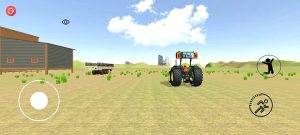
Indian Desi Simulator 3D is an Android driving and life sim game with tractors and cars across city traffic and rural fields, plus farming, open world roaming, tochan battles, and customization.
Screenshot
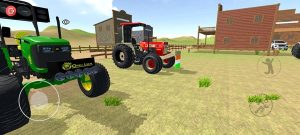
Information from indian-desi-simulator-3d
Intro to Indian Desi Simulator 3D APK
Indian Desi Simulator 3D APK is the Android install file for readers who want a quick, safe way to get the game on their phones. This guide packs verified details, clear mode breakdowns, setup tips, and performance advice so you can decide fast without trawling forums or guesswork.
Developed by Sh Gaming Studio, the game is a driving and life simulation set on Indian roads and rural tracks. You’ll find tractors, cars, buses, and bikes across city–village maps, farming tasks, tochan pulls, and open-world roaming with offline support and deep vehicle customization. Current listing info points to v0.3.2, Android 5.1+ support, an install size around 63.9 MB, and package name com.shgamingstudio.indiandesisimulator3d.
What Indian Desi Simulator 3D Offers?
This title suits tractor fans, casual drivers hunting quick sessions, and sim lovers who like tinkering with setups. A short run can be a 5–10 minute loop through town; longer sessions fit farming jobs or tochan matchups. The pace feels flexible—snackable when you’re commuting, longer when you’re chilling at home. For transparency: specs, versioning, and feature notes are drawn from the developer listing and in-game menus, not marketing fluff, so details stay grounded in what you actually get in Indian Desi Simulator 3D.
Key Features
Vehicle variety anchors the appeal: tractors for field work, compact cars for narrow lanes, buses and trucks for heavier routes, plus bikes for weaving through tight gaps. Controls respond best to smooth throttle and measured braking, rewarding players who build rhythm rather than mash pedals.
Customization isn’t window dressing. Cosmetic tweaks like paint, lights, and horns add personality, while practical choices—tire type, steering sensitivity, and gearing feel—change traction and stability. The world blends city bustle with village backroads, dotted with tea stalls and crossings, and it runs offline for no-signal moments on the go. Accessibility helps newcomers get comfy fast, with assists, sensitivity sliders, and HUD hints that reduce the learning curve.
Game Modes
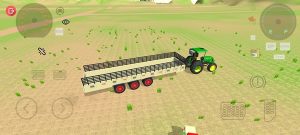
Farming mode focuses on soil prep, hauling produce, and steady driving across uneven ground. Link small tasks in smart order—load near the field, plan the path, then deliver—to cut downtime and raise payouts.
Open world mode lets you free-drive, pick up light missions, and carve sightseeing loops. A tight circuit around landmarks makes a perfect micro-session when you’ve only got a few minutes.
Tochan pulls are head-to-head strength tests. Grip beats raw power: favor tires that bite, keep revs consistent, and time your launch so the tractor settles before torque spikes. In Indian Desi Simulator 3D, smart gearing often outperforms wild horsepower.
Pros and Cons
Below is a quick snapshot to help you evaluate fit at a glance.
| Strengths | Tradeoffs |
|---|---|
| Wide vehicle mix with cultural detail | Ads in some builds |
| Offline play for data-light sessions | Physics quirks on older phones |
| Small install size for budget devices | Tractor handling has a learning curve |
| Flexible short or long play loops | Limited tutorials in places |
For a one-liner: farm-sim players will like the task chains, tinkerers will love tuning, and city-traffic drivers get tight merges and lane management in one package.
Controls, Physics, Learning Curve Tips
Treat throttle like a dimmer, not a switch. Feather gas on exits, and pair light braking with early turn-in for village corners. If a worn vehicle shows that “one-side brake” vibe, counter it with earlier, softer brake inputs and a touch of steering the opposite way to keep the line tidy.
Camera discipline helps: hood view is great for depth in traffic, chase view helps with spatial awareness on pulls. A fast practice plan works wonders—ten minutes in an empty lot to learn pedal rhythm, a village loop for cornering, then a tochan run to test traction—enough to build muscle memory in Indian Desi Simulator 3D without grinding.
Performance, Devices, and Storage Needs
The game targets Android 5.1+ and a lean install around 63.9 MB, which suits budget phones and storage-conscious users. To keep frames stable, cap FPS (if your build offers it), trim traffic density, and dial down effects on low-end devices. Battery-savvy moves—lower screen brightness and close background apps—reduce heat.
Keep 1–2× the APK size free for updates to unpack cleanly, and remember that features can vary slightly by build and device. If stutter appears in Indian Desi 3D during rush-hour traffic, scale back shadows first before touching resolution.
City vs Village Playstyle Guide
City runs reward patience. Anticipate buses, scooters, and surprise lane changes; leave a buffer, then commit confidently when space opens. Beginners can follow a clockwise loop that skips the densest junctions, while advanced players can tackle a “rush-hour challenge” through the busiest corridor to test timing and mirrors.
Village sessions feel different. Off-road ruts and soft shoulders punish heavy braking; throttle feathering keeps momentum without bouncing off line. Build a weekend routine: quick delivery in the morning, a scenic loop for screenshots at golden hour, and a short farming checklist to cap things off. Those patterns keep Indian Desi Simulator 3D fresh without turning playtime into chores.
Vehicle Tuning, Mods, and Style
Start with traction. On mud or fields, softer compounds and slightly larger profiles grip better; on asphalt, stick with tires that keep sidewalls from wobbling at speed. Resist the urge to over-power; a mild gearing adjustment often tames wheelspin better than a big engine upgrade, especially for tochan starts.
Style still matters—regional colorways, clean decals, and horn sets add vibe without hurting visibility. Use a simple A/B routine: change one variable, run the same road, and log top speed and stopping distance. That small discipline translates into real, repeatable gains in Indian Desi 3D.
Safety, Trust, and Source Checks
Keep installation hygiene tight. Confirm the package name (com.shgamingstudio.indiandesisimulator3d), scan the file before installing, and read permission prompts so nothing unexpected sneaks in. Treat version 0.3.2 as a reference point; check the latest build number and changelog before you reinstall to avoid rolling back features. For transparency in your notes, record developer name, offline status, and whether ads appear in your build—tiny details that help friends and readers set expectations clearly for Indian Desi 3D.
Final Thoughts
If you like grounded driving with cultural flavor and flexible session length, this is a solid pick; if you prefer heavy racing physics or complex economy sims, you might wait for future updates. Start with an open-world loop to learn lanes, then try a farming run and a tochan duel for quick wins in Indian Desi 3D. Ready to install? Grab the official, safe Indian Desi Simulator 3D APK from APKJaka, double-check the package name and permissions, and you’re set.
Download APK · Google PlayFAQs
What is Indian Desi Simulator 3D?
Indian Desi Simulator 3D is a driving/life sim for Android with tractors, cars, buses, and bikes across Indian city streets and village roads, plus farming tasks, open-world cruising, and tochan pulls.What is the Indian Desi Simulator 3D APK?
It’s the Android install file. Verify the package name com.shgamingstudio.indiandesisimulator3d (developer: Sh Gaming Studio) and check the version noted in the listing before you install.Does it work offline or need internet?
It runs offline for driving and missions. Internet is only useful for first-time download and updates; there’s no real-time multiplayer in typical builds.What phones does it support and how big is it?
Runs on Android 5.1+ with a small footprint (around 60–70 MB). Keep extra space for updates and close background apps on low-end devices for smoother frames.Any quick starter tips?
Begin in open world to learn traffic flow, then try farming runs; save tochan for later. Feather the throttle, reduce steering sensitivity a bit, and swap cameras when lanes feel tight.